
Blog & Vision Tech News
Explore articles, research updates, and stories on AI-powered vision technology for low-vision and blind users.
2026 Best AI Smart Glasses for Visually Impaired Buyers?
Table of Contents
- What Are AI Smart Glasses for Visually Impaired Users?
- How AI Smart Glasses Assist with Everyday Vision Tasks
- Key Features to Compare Before Buying AI Smart Glasses
- Accessibility, Comfort, Privacy, and Safety Considerations
- How to Choose the Best AI Smart Glasses in 2026
- FAQS
- Conclusion
- Related Posts
Choosing AI smart glasses for visually impaired users in 2026 requires more than comparing cameras, prices, and impressive demonstrations. The best device should support real routines, such as identifying a bus number, reading a medicine label, or locating a familiar doorway. It should also provide clear audio without overwhelming the wearer in a busy street. Comfort matters after ten minutes, but it matters even more after six hours. Battery life, prescription compatibility, phone requirements, connectivity, and repair support deserve equal attention.
This guide examines AI smart glasses for visually impaired buyers through practical and professional criteria. It considers hands-on usability, accessibility features, voice interaction, recognition accuracy, privacy controls, and product reliability. Feedback from blind and low-vision users can reveal problems that polished advertisements miss. Orientation and mobility specialists, occupational therapists, and accessibility reviewers may also offer valuable perspectives. Still, no glasses can replace a cane, guide dog, training, or personal judgment in every situation. That limitation should remain visible.
Some claims are difficult to verify.
Manufacturers may describe fast recognition, yet performance can change with glare, rain, accents, crowded rooms, or weak internet connections. A device may read a sign correctly but misunderstand a street crossing. That difference matters. Buyers should test products with familiar tasks and realistic environments whenever possible. They should also check whether data is processed locally or uploaded to a cloud service. The strongest choice may not be the newest model. It may be the one that feels dependable, comfortable, understandable, and useful during an ordinary day.
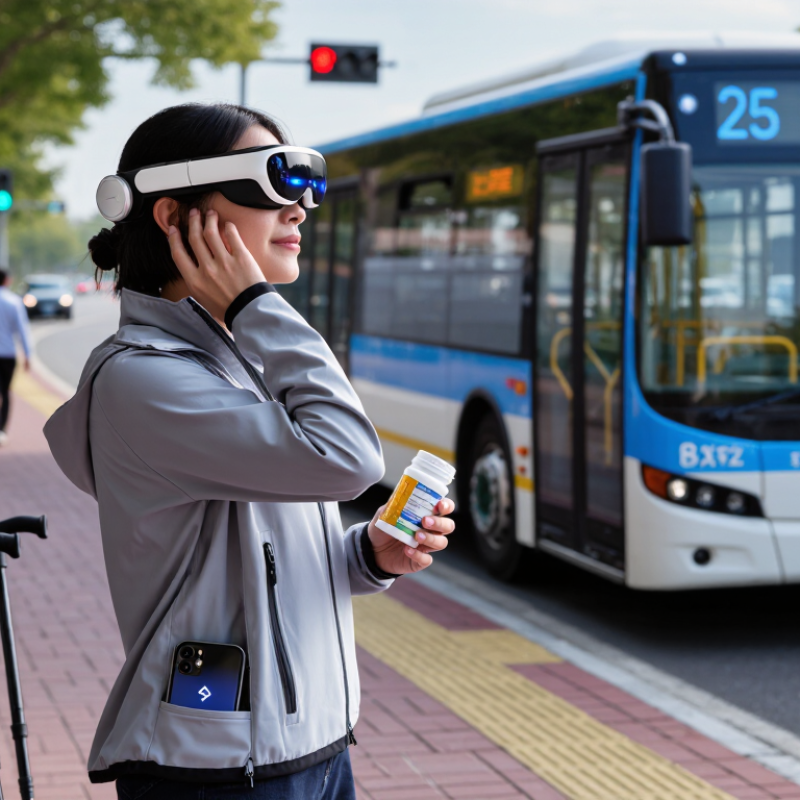
What Are AI Smart Glasses for Visually Impaired Users?
AI smart glasses for visually impaired users are wearable devices that combine a small camera, microphones, speakers, and artificial intelligence. They can describe nearby objects, read printed text, recognize colors, and identify basic scenes. Some models also answer spoken questions about what the camera sees.
The glasses usually deliver information through open-ear audio. A user might hear, “A chair is two steps ahead,” or “The sign contains three lines of text.” This hands-free design can support shopping, reading mail, checking room layouts, or locating a familiar doorway. In daily use, clear speech matters more than decorative features. Controls should also be easy to find by touch.
They are helpful, but not magical. A camera may miss a dark object, and artificial intelligence can describe a person or sign incorrectly. Weather, glare, crowded spaces, and weak internet connections may reduce accuracy. I would not use these glasses as the only tool near traffic, stairs, or unfamiliar roads. Human support, mobility training, and a white cane can remain essential. Privacy also deserves attention, because cameras may capture other people without their awareness. Before buying, users should test voice volume, text-reading speed, battery life, language support, comfort, and offline functions. Some features may sound impressive but feel slow after repeated use.
How AI Smart Glasses Assist with Everyday Vision Tasks
AI smart glasses can support everyday vision tasks through a camera, microphone, speaker, and language-based software. They may read a medicine label, describe a doorway, or identify a bus number aloud. A user can ask for a short explanation while preparing breakfast or sorting laundry. This hands-free support can reduce dependence on another person.
Performance depends on lighting, camera position, internet access, and the quality of spoken instructions. In a busy supermarket, background noise may hide important details. Text recognition can also confuse similar letters or misread small print. These glasses should support a white cane, guide dog, or trusted assistance, not replace them. I would not rely on them for traffic decisions. They are helpful, but not magical. Regular software updates and clear privacy settings also matter.
Tips: Test the glasses with familiar objects before using them outdoors. Ask for specific descriptions, such as “read the largest price” or “find the red cup.” Compare important information with another source. Keep emergency contacts accessible. A short trial can reveal comfort problems, battery limits, and confusing audio prompts. Reflect on what the device misses, not only what it recognizes.
2026 Best AI Smart Glasses for Visually Impaired Buyers? — How AI Smart Glasses Assist with Everyday Vision Tasks
| Everyday Vision Task | How AI Smart Glasses Can Assist | Typical User Output | Useful Conditions | Key Limitations to Check | Buyer Priority |
|---|---|---|---|---|---|
| Reading Printed Text | Uses a camera and optical character recognition to identify text on labels, letters, menus, signs, and documents. | Spoken text through a speaker or connected earphones; some systems can provide a short summary. | Clear, sufficiently large text with adequate contrast and stable camera positioning. | Accuracy may decrease with glare, handwriting, curved packaging, unusual fonts, low light, or very small print. | High |
| Identifying Products and Objects | Analyzes the camera view to describe common household items, packages, clothing, furniture, and other visible objects. | Audio labels such as an object category, color, or visible packaging information. | Objects should be reasonably close, unobstructed, and within the camera’s field of view. | AI may confuse similar objects or provide an incomplete description; it should not be treated as proof of product identity or safety. | High |
| Describing Scenes | Generates a natural-language description of a room, street view, table setting, or nearby activity. | Short spoken descriptions of visible people, objects, layout, colors, and actions. | Best results usually require a well-composed image and enough ambient light. | Descriptions can omit important details or misinterpret distance, direction, facial expressions, or activity. | High |
| Recognizing Faces | Some systems can help identify previously enrolled contacts or describe visible facial attributes. | Audio notification or a spoken identification result, when supported and configured. | Requires suitable camera positioning, consent-aware setup, and an appropriate contact database. | Recognition can be incorrect. Privacy, consent, local law, and social acceptability must be considered. | Variable |
| Color and Clothing Recognition | Estimates colors, patterns, clothing types, and visible matching features. | Spoken descriptions such as “dark blue shirt” or “striped fabric.” | Natural or balanced lighting and a clean camera lens improve results. | Color descriptions may be affected by lighting, camera processing, shadows, and individual color perception. | Medium |
| Currency and Payment Support | May read or classify banknotes and payment-related text using image recognition. | Spoken denomination or visible payment information, where supported. | Notes should be unfolded and fully visible; regional currency support is important. | Never rely on AI alone for payment verification. Incorrect denomination recognition can cause financial loss. | High |
| Wayfinding and Navigation | Can provide spoken directions through a connected navigation service and may describe visible signs or landmarks. | Turn-by-turn audio, location information, or answers to location-related questions. | Requires location services, a phone or network connection, and a suitable navigation application. | These glasses are not a replacement for a cane, guide dog, mobility training, or dedicated accessible navigation tools. GPS can be inaccurate near buildings and indoors. | High |
| Obstacle Awareness | May describe visible obstacles or changes in the scene when the camera can detect them. | Audio alerts or spoken descriptions of objects in the camera view. | Requires unobstructed camera view, adequate lighting, and sufficient processing speed. | Most consumer AI glasses do not provide dependable collision avoidance, depth measurement, or full-time hazard detection. | High |
| Hands-Free Voice Control | Allows the wearer to ask questions, request descriptions, start calls, or control supported phone functions. | Spoken responses and voice-activated commands. | Clear speech, microphone access, and a quiet enough environment for reliable recognition. | Wind, traffic, overlapping conversations, accents, and weak network connections can reduce command accuracy. | High |
| Audio Accessibility | Provides spoken feedback through open-ear speakers, directional speakers, or connected earphones. | Voice prompts that leave the ears partly open to surrounding sounds, depending on the design. | Useful for users who need continuous environmental awareness while receiving audio assistance. | Audio may be difficult to hear in traffic or crowded areas. Volume limits, hearing needs, and sound leakage should be checked. | High |
| Connectivity and Cloud Processing | Transfers images, voice requests, or AI tasks to a paired phone or online service for processing. | More advanced answers and descriptions than basic offline functions may provide. | Stable Bluetooth, phone compatibility, account access, and reliable internet connectivity. | Offline operation may be limited. Data charges, service interruptions, latency, and privacy policies are important buyer considerations. | High |
| Battery and Daily Wear | Supports repeated camera, audio, and voice-assistant use throughout daily activities. | Operating time varies according to camera use, call duration, audio volume, and network activity. | A charging routine, portable charger, and comfortable fit improve practical usability. | AI-intensive tasks generally consume more power. Confirm charging time, battery replacement policy, weight, heat, and frame comfort. | High |
| Privacy and Data Controls | May include camera indicators, recording controls, permission settings, data deletion tools, and account controls. | Visual or audible indication when the camera or microphone is active, depending on device design. | Clear documentation and easily accessible privacy settings. | AI services may process images, voice recordings, or contact information. Review retention, sharing, training, and deletion policies before purchase. | High |
| Prescription and Physical Accessibility | Can support vision correction or accessibility needs when compatible lenses, frame sizes, controls, and adjustment options are available. | More comfortable and consistent use during reading, walking, or extended audio sessions. | Professional fitting, suitable bridge and temple design, tactile controls, and compatibility with prescription lenses. | Not every frame supports all prescriptions. Weight, fit, button placement, and eyewear compatibility can strongly affect usability. | High |
| Reliability and Safety | Acts as an assistive information tool for interpreting selected visual scenes and completing routine tasks. | Additional spoken context that can support independence in everyday situations. | Use alongside established mobility techniques, human assistance, and other accessibility devices. | AI can hallucinate, misread, miss hazards, or respond with unjustified confidence. Do not use it as the sole source for medical, legal, mobility, or emergency decisions. | High |
Key Features to Compare Before Buying AI Smart Glasses
Choosing the best AI smart glasses for visually impaired buyers requires more than checking camera quality. Compare optical character recognition, object identification, and scene descriptions in real conditions. Test printed labels, dim rooms, crowded sidewalks, and handwritten notes. Recognition speed matters when a bus arrives or a doorway is unclear. Audio should sound natural, with adjustable volume and speech speed. Some systems describe too much. That can become tiring.
Comfort is equally important. Check the frame weight, nose support, lens options, and button placement. Voice control should work with short, simple commands. Battery life must cover a normal day, not just laboratory testing. Also examine offline functions, because poor internet can interrupt useful feedback. Privacy deserves careful attention. Ask where images are processed, how long data is stored, and whether recording is clearly indicated. A trusted product should explain these points plainly.
Tips: Compare devices with a mobility professional or a low-vision specialist when possible. Bring familiar objects, medication packages, and common documents for testing. Do not rely on one feature. I would also keep a traditional cane or another approved aid available, since AI can misread shadows, faces, and street signs. No system performs perfectly. That limitation is easy to forget when the demonstration looks impressive. Check warranty coverage, software updates, repair options, and customer support before buying. A slightly less advanced device may be safer if it remains comfortable, predictable, and easy to operate.
Accessibility, Comfort, Privacy, and Safety Considerations
2026 Best AI Smart Glasses for Visually Impaired Buyers?
For visually impaired users, accessibility should guide every purchase decision. Voice feedback must be clear, adjustable, and usable without complex gestures. Test whether spoken descriptions identify doors, stairs, signs, and nearby obstacles accurately. AI can misunderstand shadows, crowded spaces, or unfamiliar objects. It should support mobility skills, not replace a cane, guide dog, or professional training.
Comfort matters during long walks and indoor tasks. Frames should feel balanced, avoid pressure behind the ears, and remain stable during head movement. Check battery life during a realistic day, not only in a laboratory claim. Privacy also deserves careful attention. Look for visible recording indicators, clear data policies, and settings that limit cloud processing. People nearby may not realize a camera is active. That social problem is easy to underestimate.
Tips: Test the glasses with a trusted mobility professional. Try them outdoors, indoors, and in noisy traffic. Ask a sighted companion to verify descriptions. Keep emergency contacts and essential controls accessible without vision. Never depend on one device for navigation. I would also test failure modes deliberately, because an incorrect description can feel more dangerous than silence. My first assumption might be wrong. A short trial period can reveal dizziness, delayed alerts, confusing audio, or privacy discomfort before a costly commitment.
How to Choose the Best AI Smart Glasses in 2026
Choosing the best AI smart glasses in 2026 starts with the wearer, not the device. The World Health Organization reports that at least 2.2 billion people live with vision impairment worldwide. Needs vary widely. A buyer with low vision may prioritize text reading, while someone with limited peripheral vision may need obstacle alerts and reliable scene descriptions. Ask an eye-care professional to document practical needs before comparing features.
Test speech clarity in a busy room. Test it outdoors. Check whether controls work without precise finger movements. The WHO and UNICEF Global Report on Assistive Technology estimates that more than 2.5 billion people need assistive products, yet access remains uneven. This makes repair options, offline functions, battery replacement, and clear pricing as important as artificial intelligence. A clever camera is not enough.
Privacy and accuracy require close inspection. Look for visible recording indicators, local data processing, adjustable speech speed, and understandable data policies. The NIST AI Risk Management Framework recommends evaluating validity, reliability, transparency, and human oversight. Those principles fit wearable vision tools well. Ask how often descriptions fail, not only how impressive demonstrations look. I would not trust one showroom test. Try familiar streets, handwritten labels, stairs, and dim hallways. Performance may change with weather, accents, glare, or weak connectivity. Independent user trials and accessibility reviews deserve more weight than polished advertising. My judgment would remain provisional until the glasses perform consistently in daily routines.
FAQS
They are wearable devices with a camera, microphones, speakers, and artificial intelligence. They can describe objects, read printed text, identify colors, and explain simple scenes. Information usually arrives through open-ear audio.
They may read a food label, identify a doorway, or announce a bus number. A user can ask short questions while sorting laundry or preparing breakfast. Hands-free support can make some routines easier.
No. They should support, not replace, mobility aids or trained assistance. I would not rely on them near traffic, stairs, or unfamiliar roads. They can miss hazards.
Dark rooms, glare, crowded spaces, background noise, and weak internet can cause problems. Small print may be misread. A shadow can become the wrong object. It happens.
Compare text reading, object recognition, scene descriptions, audio speed, volume control, and battery life. Test handwritten notes, medicine packages, dim rooms, and busy sidewalks. Laboratory results may not reflect daily use.
Comfort depends on frame weight, nose support, lens options, and button placement. Speech that is too detailed can become tiring. A short trial may reveal pressure, slow responses, or confusing prompts.
Ask where camera images are processed and how long they are stored. Check whether recording is clearly indicated. Other people may appear in the camera view without realizing it. Privacy needs active attention.
Start with familiar objects, such as a red cup, a doorway, or a printed label. Use specific commands like, “Read the largest price.” Compare important information with another source. Notice what the device misses.
Some functions may work offline, but capabilities differ. Poor connectivity can interrupt spoken feedback. Check offline performance before purchase. A backup aid remains sensible.
Keep a traditional cane, emergency contacts, and trusted assistance accessible. Check software updates, repairs, warranty coverage, and customer support. Advanced features are less useful when controls feel unpredictable.
Conclusion
AI smart glasses for visually impaired users combine wearable cameras, audio feedback, voice control, and artificial intelligence to help interpret the surrounding environment. They may describe objects and people, read printed text, recognize colors or signs, identify currency, provide navigation prompts, and support hands-free communication. These functions can make everyday activities more manageable while offering information through speech or other accessible signals.
When comparing options in 2026, buyers should consider recognition accuracy, response speed, battery life, camera performance, voice clarity, language support, connectivity, and compatibility with accessibility tools. Comfort is equally important, including frame weight, adjustability, lens options, and ease of use over long periods. Privacy and safety should also guide the decision: users should understand how images and recordings are processed, control data permissions, and remember that smart glasses are assistance tools rather than replacements for professional mobility training or personal judgment. The best choice will balance useful features, dependable performance, comfort, privacy protection, and overall affordability.

Blog Tags: