
Choosing obstacle detection glasses for blind users is not a simple technology purchase. It is a decision about safety, confidence, comfort, and daily independence. The best device should support real movement, not create unrealistic promises.
Dr. Chieko Asakawa, an IBM accessibility pioneer, has said, “Technology can make the impossible possible.” Her words capture the promise of obstacle detection glasses for blind users, but they also invite careful testing. A device may detect a wall in a quiet hallway, yet miss a low branch, a glass door, or a fast-moving bicycle. Real streets are messier.
This guide examines the features that matter in everyday use. Detection range matters. So do warning speed, vibration patterns, audio clarity, battery life, weight, and weather resistance. A heavy frame can become uncomfortable after several hours. Loud alerts may hide traffic sounds. Subtle vibration may be difficult to notice outdoors.
Look for glasses that work alongside a white cane or guide dog. They should add information, not replace trusted mobility skills. Test them in familiar and unfamiliar places. Try stairs, narrow shop aisles, uneven pavements, and crowded crossings.
Some choices remain uncertain. No sensor performs perfectly in every environment. Marketing language can sound more confident than the evidence. Independent reviews, rehabilitation professionals, and hands-on trials deserve attention. The right pair should feel predictable, adjustable, and useful—not merely futuristic.
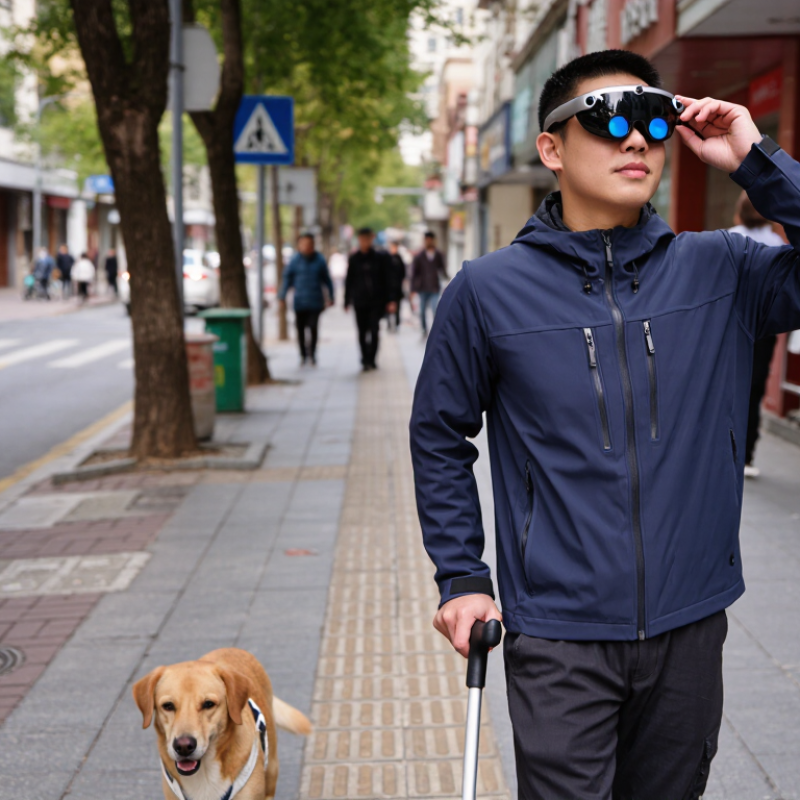
Obstacle detection glasses can add useful information to a blind person's existing mobility routine. Small sensors may detect walls, branches, poles, or moving objects. The glasses then provide vibration, sound, or both. This feedback can warn users before contact occurs. However, the device does not create a complete map. A white cane or guide dog remains important for ground-level hazards. No device is perfect.
Choosing suitable glasses starts with the user's daily environments. A quiet home, crowded station, and sunny sidewalk create different demands. Ask how far sensors detect obstacles and how alerts change with distance. Adjustable volume and vibration strength matter in noisy streets. The frame should feel stable without pressing the nose or ears. Check battery life, charging time, water resistance, and control simplicity. These details affect independence more than attractive features.
A supervised trial is safer than relying on a product description. An orientation and mobility specialist can test the glasses across familiar and unfamiliar routes. Users should practice stopping, turning, and identifying false alerts. Bright sunlight, rain, narrow doorways, and hanging branches may expose weaknesses. That can be frustrating. I would also compare alert accuracy with comfort over several days. A clever sensor is not helpful if users stop wearing it. Results may vary between people, so honest feedback should guide adjustments.
Choosing obstacle detection glasses starts with understanding how they sense danger. Ultrasonic sensors estimate distance through sound waves. Time-of-flight cameras measure reflected light. Stereo cameras compare two visual angles, while artificial intelligence classifies objects such as poles, steps, and moving people. Each method has limits. Bright sunlight, rain, glass doors, and crowded sidewalks can reduce reliability.
The WHO-UNICEF Global Report on Assistive Technology (2022) estimates that more than 2.5 billion people need assistive products worldwide. The WHO World Report on Vision (2019) also identifies at least 2.2 billion people with near or distance vision impairment. These figures support careful product selection, not rushed purchasing. Ask for tested detection ranges, alert latency, false-negative rates, and performance in low light. Noise matters. Audio warnings should remain understandable near traffic. Haptic alerts can add a quiet second channel.
Safety features deserve equal attention. Look for adjustable volume, vibration intensity, low-battery warnings, quick charging, and a simple emergency control. Water resistance helps during sudden rain, but an IP rating does not guarantee full protection. Review testing against ISO 14971 risk-management principles where available. Privacy also matters when cameras record surroundings. Try the glasses with a mobility professional and familiar routes. A device may detect a chair but miss a thin branch. That is an uncomfortable gap. Real-world trials should include stairs, reflective surfaces, uneven pavement, and noisy crossings.
Choosing obstacle detection glasses for blind users requires more than checking sensing range. Comfort and fit often decide whether the device is worn after the first week. Frames should rest securely without pressing the temples, ears, or nose. A lightweight design matters during long walks, shopping trips, and public transport.
Controls should be easy to identify by touch. Raised buttons, clear vibration patterns, and simple voice prompts can reduce confusion. Controls that require several taps may become frustrating outdoors. Test them while wearing gloves or carrying a bag. The device should provide timely warnings without replacing a cane, guide dog, or established mobility skills. A qualified vision professional can help assess whether alerts suit the user’s hearing, movement, and daily routes.
Tips: Try the glasses indoors first, then on a familiar sidewalk with a trusted companion. Notice false alarms near tree branches, parked bicycles, and doorframes. Ask whether charging is practical every day. Battery anxiety is real. Check the adjustment range and return policy before buying. One overlooked detail is sound leakage, which may make conversations uncomfortable. Some users prefer vibration; others need spoken feedback. Personal preference matters, and early impressions can be wrong. Give the glasses several calm trials, but stop using them if alerts become confusing or unsafe.
How to Choose Obstacle Detection Glasses for Blind Users
Alerts should be clear, fast, and adjustable. Voice prompts may help outdoors, while vibration can work better in noisy stations. Test whether alerts distinguish a doorway from a person. A warning that arrives one second late can still matter. The World Health Organization estimates that at least 2.2 billion people have near or distance vision impairment. That figure shows why personal testing matters, not just attractive specifications.
Accuracy should be measured across practical scenes. Try narrow corridors, stair edges, parked bicycles, and moving pedestrians. Ask an orientation and mobility specialist to observe the tests. Check detection distance at one, two, and three metres. Also record false alarms. Too many alerts can create hesitation or alert fatigue. I would not trust a device after one successful walk. Even strong sensors can struggle with black clothing, glass doors, bright sunlight, or crowded sidewalks.
Battery claims need real-world checking. Compare continuous operating time, charging time, and performance with frequent alerts. A device lasting twelve hours in a laboratory may last less during constant vibration. Environmental protection also matters. IEC 60529 water-resistance ratings describe controlled tests, not every heavy rainstorm. Look for stable operation in heat, cold, dust, and light rain. Keep a backup travel plan. That is inconvenient, but realistic. WHO’s World Report on Vision (2019) supports user-centred care, and ISO 9241-210 recommends evaluating technology within real user contexts.
| Detection Approach | Typical Alert Method | Practical Detection Range | Alert Latency | Obstacle Detection Reliability | Battery Runtime | Indoor Performance | Outdoor Performance | Weather and Lighting Limits | Best Use Case |
|---|---|---|---|---|---|---|---|---|---|
| Ultrasonic sensing | Vibration, beeps, or spoken distance cues | Approximately 0.2–4 m, depending on sensor power and object size | Usually very low; often below 200 ms | High for solid obstacles Less reliable for narrow, soft, angled, or sound-absorbing objects |
Approximately 8–20 hours | High Works in normal indoor lighting and darkness |
Moderate to high Useful for walls, vehicles, poles, and large objects |
Heavy rain, wind noise, and irregular surfaces can reduce consistency; does not identify object type | Simple close-range collision warning and low-power wearable assistance |
| Time-of-Flight depth sensing | Directional vibration, tones, or distance-based audio | Approximately 0.1–10 m, depending on the sensor and target reflectivity | Low; generally suitable for real-time warning | High for depth measurement Performance can decline with very dark, reflective, or transparent surfaces |
Approximately 4–12 hours | High Depth sensing is largely independent of visible light |
Moderate Strong sunlight can interfere with some infrared systems |
Bright sunlight, glass, mirrors, black materials, and heavy rain may create inaccurate readings | Precise distance alerts when depth information is more important than object recognition |
| Stereo or structured-light vision | Spatial audio, voice prompts, or haptic direction cues | Approximately 0.5–10 m, depending on camera baseline and scene detail | Low to moderate; processing load affects response time | High in well-textured scenes Weak texture, glare, and motion can reduce depth accuracy |
Approximately 2–8 hours | High in adequate lighting | Moderate Can work outdoors but requires careful exposure control |
Low light, direct sun, fog, rain, repetitive patterns, and transparent objects may reduce accuracy | Users who need directional information and a broader 3D view of nearby obstacles |
| RGB camera with computer vision | Speech descriptions, object labels, tones, or visual-to-audio feedback | Approximately 0.5–15 m, depending on lens, resolution, and software | Moderate; commonly affected by on-device processing and scene complexity | Moderate to high for recognized objects Detection depends heavily on training data and visibility |
Approximately 2–8 hours | High with adequate illumination | Moderate Outdoor contrast and glare can affect recognition |
Darkness, backlighting, fog, rain, occlusion, and unfamiliar objects can reduce recognition accuracy | Object identification, signs, doors, people, and scene description rather than distance-only alerts |
| Multimodal sensing | Combined haptic, tonal, directional-audio, and spoken alerts | Approximately 0.2–10 m for immediate hazards; longer ranges may be available for camera-based functions | Low to moderate; depends on sensor fusion and alert prioritization | Highest overall resilience Different sensors can compensate for one another, but false alerts remain possible |
Approximately 3–10 hours | High Combines distance and visual information |
Moderate to high Performance depends on the balance of sensors used |
More components mean more possible failure points; rain, glare, heat, and sensor obstruction still matter | Users who need both immediate collision warnings and higher-level environmental information |
How to interpret the data: The ranges are representative engineering ranges for wearable obstacle-detection systems, not guaranteed specifications for every device. Actual performance varies with sensor placement, processing software, alert settings, battery capacity, user movement, object material, weather, and local lighting conditions.
Selection priority: For safe daily use, prioritize low alert latency, clearly distinguishable alerts, reliable close-range detection, manageable false-alert frequency, comfortable weight, accessible controls, and a battery that lasts through the intended period of use.
Choosing obstacle detection glasses should begin with a supervised, hands-on trial. Ask an orientation and mobility specialist to test them in familiar and unfamiliar spaces. Try corridors, doorways, low branches, stairs, and crowded pavements. Notice whether alerts are clear, timely, and easy to distinguish from ordinary sounds. Test with sunlight, indoor lighting, rain, and background traffic when safe. Do not treat glasses as a replacement for a cane or guide dog. That assumption can create dangerous gaps.
Support matters after purchase. Confirm setup training, accessible manuals, software updates, repair options, and response times. Ask whether a family member or mobility professional can join the first fitting. Reliable suppliers should explain detection limits without exaggerated promises. Request written warranty terms and clear return instructions. Keep records. Compare the full cost, including subscriptions, replacement parts, charging equipment, and transport to service appointments. A cheaper device may become expensive when support is distant or unavailable.
Before paying, use a short scoring sheet. Rate comfort, false alerts, missed obstacles, battery life, and confidence after each session. Invite honest feedback from the wearer, not only from relatives. One weakness may outweigh several impressive features. Even careful testing cannot predict every street situation. If alerts remain confusing after repeated practice, pause and reassess. More testing is sometimes wiser than a quick purchase.
The chart presents a practical review weighting for testing obstacle-detection glasses. Detection performance is prioritized first, followed by comfort, battery life, user support, and total cost. These criteria can help users compare products without relying on brand names.
During testing, evaluate obstacle detection at different distances, check false alerts in crowded environments, wear the glasses for extended periods, confirm battery performance, review accessibility support, and compare the total purchase and maintenance cost.
They may use ultrasonic sensors, time-of-flight cameras, stereo cameras, or artificial intelligence. Each method has limits. Bright sunlight, rain, glass doors, and crowds can reduce accuracy.
Test corridors, doorways, stairs, low branches, uneven pavement, and crowded sidewalks. Try both familiar and unfamiliar routes. Watch for missed obstacles.
No. They should support, not replace, established mobility tools. Relying only on glasses can create dangerous gaps.
Check whether sound alerts are clear near traffic. Test vibration as a quieter second channel. Alerts should be timely and easy to distinguish.
Look for adjustable volume, vibration control, low-battery warnings, quick charging, and simple emergency controls. Water resistance helps during rain, but it is not complete protection.
Ask about training, accessible manuals, software updates, repairs, and response times. Request written warranty and return details. Keep the records.
Include subscriptions, replacement parts, charging equipment, and travel for service appointments. A cheaper device may cost more later. That possibility is easy to miss.
Use a short scoring sheet for comfort, false alerts, missed obstacles, battery life, and confidence. Invite honest feedback from the wearer. A perfect score is unlikely.
Pause and reassess after repeated practice. More testing may be wiser than a quick purchase. The device may detect a chair but miss a thin branch. That gap matters.
Choosing obstacle detection glasses for blind users requires more than selecting the most advanced-looking device. These glasses can support independent mobility by detecting nearby objects, changes in elevation, and potential hazards, then communicating warnings through sound, vibration, or other accessible alerts. Buyers should compare the detection technology, coverage range, response speed, accuracy, and performance in varied environments, including low light, crowded areas, and outdoor settings. Safety features such as adjustable alert levels and dependable obstacle recognition are also important.
Comfort and everyday usability should guide the final decision. Consider frame weight, fit, control simplicity, prescription compatibility, battery life, charging time, and resistance to weather or regular wear. Before purchasing, users should test obstacle detection glasses for blind in realistic situations whenever possible, assess the clarity of alerts, and review customer support, warranty coverage, software updates, and total cost. A suitable choice should balance reliable assistance, personal comfort, practical performance, and budget rather than focusing on a single technical feature.