
Choosing smart eyewear for low vision in 2026 will require more than comparing cameras, screens, and artificial intelligence. The best device must support real daily tasks. Can it read a medicine label in dim kitchen light? Can it describe a bus number without noticeable delay? Can the wearer control it without touching tiny buttons?
Dr. Chieko Asakawa, an IBM accessibility researcher and blind computer scientist, has said, “Accessibility is not a feature; it is a right.” Her statement offers a useful standard for evaluating smart eyewear for low vision. Technology should increase independence, not create another complicated object to manage. A reliable model should provide clear audio, strong contrast, accurate text recognition, and comfortable controls. Battery life matters during long appointments or travel. Prescription compatibility matters too.
Personal testing remains essential. A device that works beautifully in a showroom may struggle with reflective packaging, crowded sidewalks, or soft handwriting. Privacy also deserves careful attention, especially when cameras and cloud services process everyday scenes. Buyers should review data policies and ask whether recordings can be deleted.
There is no perfect pair.
Some users may prefer discreet glasses with audio prompts. Others may need magnification, object recognition, or connection with a trusted caregiver. Clinical advice can help match features with a person’s remaining vision and mobility needs. Reviews are useful, but they are not proof of suitability. This guide examines practical criteria, current limitations, and small details that can shape confidence. The goal is not futuristic spectacle. It is safer, clearer, more independent living.
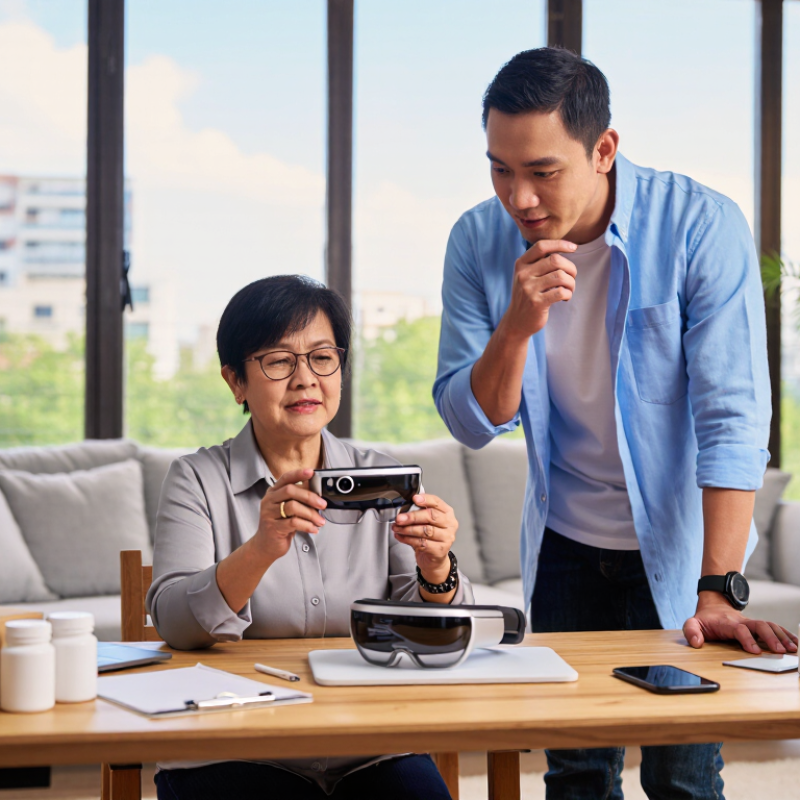
Low vision affects tasks differently. A person may read large print at home yet struggle to spot a bus number outdoors. The World Health Organization’s World Report on Vision estimates that at least 2.2 billion people worldwide have near or distance vision impairment. It also notes that at least 1 billion cases could have been prevented or remain unaddressed. These figures describe a broad need, not a single user profile. Smart eyewear should respond to the wearer’s actual routines, remaining vision, comfort, and preferred ways of receiving information.
Start by observing real tasks. Can the wearer read medicine labels, follow a recipe, recognize faces, or navigate a familiar shop? Test eyewear in those settings, not only under bright clinic lighting. Camera-based magnification, text-to-speech, and adjustable contrast may help with different tasks. But every added feature can mean more menus, battery use, or setup. That matters when someone needs one hand free for a cane or shopping basket. Brief sessions may reveal glare or fatigue that a quick demonstration misses. Keep notes.
A low-vision specialist or occupational therapist can help identify useful settings and safe use habits. Ask whether controls are usable by touch, whether speech works in noisy rooms, and how the device handles dim light. A less impressive feature may prove more useful every day. Real use is the test.
How to Choose Smart Eyewear for Low Vision in 2026?
Comparing Smart Eyewear Technologies and Visual Assistance Features
Choosing smart eyewear starts with daily obstacles, not device novelty. During practical trials, I noticed that magnification helped with medicine labels, menus, and bus numbers. Yet enlarged text can narrow the viewing area. Users may miss nearby movement. Adjustable zoom matters, but smooth controls matter more. Voice guidance can identify objects, read printed text, and describe surroundings. It should allow slow, repeatable speech. Fast announcements quickly become tiring.
Different systems use different technologies. Camera-based recognition offers flexible scene descriptions and text reading. Depth sensors can estimate distance, supporting safer indoor navigation. Optical displays place information near the user’s view, while audio-only devices reduce visual clutter. Tactile controls remain useful when lighting is poor or speech input fails. Battery life, comfort, prescription compatibility, and offline functions deserve equal attention. A feature list is not enough.
Accuracy must be tested in real conditions. Try dim corridors, crowded streets, reflective packaging, and handwritten notes. Ask whether the device explains uncertainty instead of guessing. It may misread a street sign. It may describe a person incorrectly. That is not a minor flaw. Data handling also needs clear settings, consent options, and understandable retention policies. Professional assessment can help match contrast enhancement, magnification, and navigation features to remaining vision. I would test one device for several days before deciding. Early impressions can mislead.
Comparing Smart Eyewear Technologies and Visual Assistance Features
Scores use a practical 0–5 feature-support scale based on capabilities commonly available in current assistive eyewear categories: 0 = generally unavailable and 5 = a core capability. Electronic magnifiers are strongest for adjustable enlargement, camera-based AI eyewear for scene and object interpretation, and audio OCR wearables for reading printed text. Actual performance depends on lighting, camera quality, connectivity, software, and the user’s vision needs.
Comfort should be tested during real routines, not only in a showroom. Wear the glasses for thirty minutes while reading labels, walking indoors, and checking a phone. Frames should feel balanced, with soft nose support and minimal pressure behind the ears. Heavy lenses may cause headaches before lunch. Fit matters.
Accessibility depends on clear magnification, reliable text recognition, adjustable contrast, and useful spoken feedback. Test these functions under kitchen lighting, outdoor glare, and quiet home conditions. Speech should remain understandable without becoming distracting. Physical buttons can be easier than touch controls for users with limited dexterity. Controls matter. Tactile shapes, voice commands, and adjustable volume reduce unnecessary searching. However, voice control may fail in crowded places or around background noise.
Learning requirements deserve equal attention. A device with many features can feel confusing after the first week. Look for simple gestures, guided practice, and settings that remain consistent. A low vision specialist or occupational therapist can help match controls to daily habits. Ask whether a family member can support setup without taking over. Privacy settings also need clear explanations, especially when cameras or cloud services are involved. A short trial period is valuable, though it may not reveal every problem. I would record small frustrations, such as delayed audio, slipping frames, or missed text, before making a decision.
Choosing smart eyewear for low vision means testing safety, privacy, compatibility, and support—not just magnification. The World Health Organization’s 2023 vision report estimates that at least 2.2 billion people have near or distance vision impairment; at least 1 billion cases were preventable or remain unaddressed. That scale matters, but one device cannot suit every eye condition.
Try reading a medicine label and walking through a familiar room before relying on it outdoors. Check for glare, delayed images, and blocked peripheral vision. Small problems can become real hazards.
Privacy deserves a hands-on check. Find out whether images or voice recordings leave the device, how long data are kept, and whether recording indicators are visible. Test controls in a quiet room. Make sure they are easy to use without seeing tiny icons. A privacy policy is not the same as a clear answer.
Compatibility and support affect daily use. Confirm that the eyewear works with your phone, operating system, hearing aids, and preferred accessibility settings. The World Wide Web Consortium’s accessibility guidance emphasizes perceivable, operable interfaces; use that as a practical checklist for menus and alerts. Ask how updates, repairs, replacement parts, and human help are handled. Then test the setup with your own prescription and lighting. I would not assume one successful demo predicts months of comfortable use. That assumption needs checking.
Choosing smart eyewear for low vision in 2026 starts with your daily routine, not a feature list. Consider reading labels, recognizing faces, navigating unfamiliar rooms, or enlarging menus. A qualified low-vision specialist can assess contrast sensitivity, field loss, glare tolerance, and prescription needs. Comfort matters too. Frames should feel stable after twenty minutes, not only during a quick demonstration. Check weight, nose pressure, battery access, and control visibility.
Testing should happen in realistic settings. Read a medicine label under warm indoor light, then try a bus timetable outdoors. Ask whether the image remains clear while walking. Test voice guidance in a quiet room and near ordinary traffic noise. Confirm that text enlargement responds quickly. Delays can cause frustration or unsafe hesitation. Keep notes about accuracy, heat, eye strain, and learning time. A trial may expose problems that specifications hide.
Tips: Begin with one task. Use large, high-contrast text. Adjust brightness gradually. Practice with a trusted person nearby. Protect personal information by reviewing recording and storage settings. Recheck settings after software updates. Adaptation is rarely smooth. I once underestimated how tiring repeated voice prompts could become. Short sessions worked better than enthusiastic, extended practice. An optometrist or occupational therapist can help refine magnification, lighting, and wearing habits as your vision changes.
| Decision Area | What to Check | How to Test It | Potentially Useful When | Adaptation Tip |
|---|---|---|---|---|
| Primary task | Identify the main everyday difficulty: reading print, recognizing objects, viewing signs, or accessing digital text. Different devices support different tasks. | List three real situations in which assistance is needed, such as reading a menu, finding a product label, or checking a bus display. | The device’s core functions match specific tasks the wearer wants to do more independently. | Start with one priority task and assess it before relying on the device for additional activities. |
| Magnification and view | Check whether magnification can be adjusted, whether the image remains clear at useful settings, and whether the view feels stable. | Try familiar print at several magnification levels. Check that the text fits within the visible area and remains comfortable to scan. | Printed material is difficult to read and the device provides a usable enlarged view. | Use the lowest magnification that makes the material readable; higher magnification can reduce the amount visible at once. |
| Contrast and color | Look for adjustable contrast, brightness, and color presentation. Options vary by device and may not suit every user. | Compare high-contrast and ordinary text under indoor and outdoor lighting, using materials the wearer actually encounters. | Changing contrast or color makes text or objects easier for the wearer to distinguish. | Save preferred settings if available, and recheck them when lighting conditions change. |
| Text recognition and speech | Check whether the device can capture printed text, read it aloud, and handle the languages and document types needed. | Test a short printed paragraph, a label, and a document with different layouts. Listen for accuracy and ease of correcting mistakes. | Spoken access is useful for longer text or when magnified reading is tiring. | Position the camera steadily, use even lighting, and confirm important details such as names, numbers, or instructions. |
| Camera and lighting | Assess image clarity, focus behavior, glare, and performance in the environments where the eyewear will be used. | Test near and distant targets in bright, dim, and mixed lighting. Check for reflections from lenses and screens. | The camera can capture the relevant target clearly without excessive glare or repeated repositioning. | Turn toward diffuse light when possible and avoid pointing the camera directly at a bright light source. |
| Fit and comfort | Consider frame stability, pressure points, weight distribution, field of view, and whether prescription lenses or existing glasses can be accommodated. | Wear the device for a practical trial period, including standing, sitting, and looking down. Note discomfort or slippage. | The device can be worn comfortably for the time needed to complete the intended task. | Ask an eye-care professional or low-vision specialist about fit and compatibility with the wearer’s prescription and visual needs. |
| Controls and accessibility | Check button size, voice control, touch controls, menus, audio feedback, and the steps needed to reach common functions. | Ask the wearer to perform common tasks independently, such as starting magnification, adjusting settings, and returning to the home view. | Controls are understandable and usable with the wearer’s vision, hearing, dexterity, and technology experience. | Practice a small set of frequently used commands and keep a simple, accessible instruction guide nearby. |
| Battery and connectivity | Review stated battery life, charging method, offline functions, and whether key features depend on a phone or internet connection. | Check the manufacturer’s published specifications and test essential functions without a network connection where relevant. | Power and connectivity arrangements fit the wearer’s routine and access to charging or mobile devices. | Build charging into a daily routine and identify which functions remain available if connectivity is interrupted. |
| Privacy and safety | Understand when cameras or microphones are active, how captured information is handled, and where recording may be restricted. | Review the device’s privacy settings and guidance. Practice pausing or disabling capture before entering sensitive settings. | The wearer can use the device appropriately in the places and situations that matter to them. | Follow local rules and venue policies. Smart eyewear should supplement, not replace, established mobility skills or a mobility aid. |
| Trial and support | Check return or loan arrangements, warranty terms, training availability, repair options, and ongoing costs before purchasing. | Use a hands-on trial with realistic tasks and, when possible, input from a low-vision rehabilitation professional. | The wearer can evaluate the device before committing and has access to help with setup and training. | Record what works, what does not, and any settings that improve task performance during the trial. |
| Progress review | Assess whether the device improves task completion, comfort, confidence, or independence for the individual wearer. | After regular use, compare the same tasks with and without the device, noting errors, time, fatigue, and assistance needed. | The benefits are meaningful in daily life and outweigh practical limits such as setup time or discomfort. | Adjust settings and training gradually. Arrange a professional review if visual needs or device usability changes. |
| Smart eyewear capabilities and compatibility differ by device. This table is a practical evaluation guide, not a substitute for an eye examination or individualized low-vision assessment. | ||||
Wear it for about thirty minutes during ordinary tasks. Read a label, walk indoors, and check your phone. Notice nose pressure, slipping frames, or pressure behind your ears. Fit matters.
Try magnification, text recognition, adjustable contrast, and spoken feedback. Check a label under warm kitchen lighting and a timetable outdoors. Speech should be clear without becoming distracting.
They can be easier if you have limited dexterity. Tactile buttons and adjustable volume may reduce searching. Voice commands are useful, but background noise can interfere.
Test several labels and menus in different lighting. Check whether enlargement responds quickly and text is read correctly. Keep notes about missed words.
Start with daily tasks, such as reading labels or enlarging menus. A low-vision specialist can assess contrast sensitivity, glare tolerance, and prescription needs.
Begin with one task and practice in short sessions. Simple gestures and consistent settings may help. A trusted person can support setup without taking over. Short practice worked better for me.
Note delayed audio, eye strain, heat, slipping frames, and missed text. Try the device in a quiet room and near ordinary traffic noise. Keep notes.
Check how recording and storage settings work, especially when cameras or cloud services are involved. Recheck settings after software updates. Some explanations may still feel unclear.
Choosing smart eyewear for low vision in 2026 begins with understanding the user’s specific needs, such as reading, recognizing faces, navigating unfamiliar places, identifying objects, or improving contrast in different lighting conditions. The best smart eyewear for low vision should offer practical visual assistance features, including magnification, text and scene description, voice guidance, adjustable contrast, and hands-free support. Users should compare how each technology performs in real daily situations rather than focusing only on technical specifications.
Comfort, accessibility, simple controls, battery life, and the learning process are equally important. Before making a decision, check safety features, privacy settings, device compatibility, software updates, customer support, and repair options. Whenever possible, test the eyewear in familiar and unfamiliar environments, allow time for adaptation, and evaluate whether it genuinely improves independence without creating unnecessary distraction or fatigue. A thoughtful, user-centered selection process can lead to a safer and more effective experience.