
Choosing a wearable AI vision aid can make everyday information easier to access, one spoken detail at a time. A camera mounted on glasses or a handheld device may identify a door sign, read a package label, or describe nearby objects. Features vary by model, and results depend on lighting, camera position, and clear audio. Small details matter.
Dr. Chieko Asakawa, an IBM computer scientist and accessibility researcher, has said, “I want to make the world more accessible.” That goal helps explain the appeal of assistive technology: it can offer useful information while leaving decisions with the wearer. A device might read a street sign aloud, but it cannot guarantee that every description is complete or correct. No magic button.
Before choosing, consider comfort, battery life, privacy settings, language support, and whether the device works without an internet connection. Try it in familiar places first. Notice how it handles glare, quiet speech, and cluttered shelves. Some prompts may be wrong, delayed, or simply unhelpful. That deserves attention, not excuses.
A wearable AI vision aid may suit someone who wants hands-free access to visual information, but needs and preferences differ. Compare real-world demonstrations, check the manufacturer’s support details, and ask an eye-care or rehabilitation professional about fit with existing tools. The right choice is practical, not perfect.
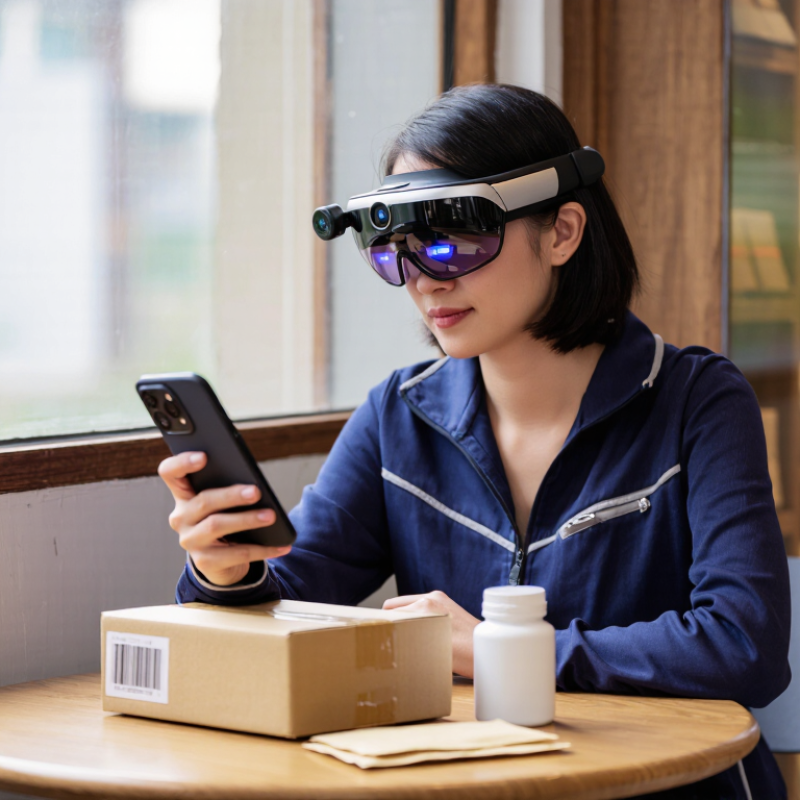
A wearable AI vision aid is a hands-free device that uses a camera, a small processor, and artificial intelligence to interpret parts of a user’s surroundings. It may read printed text aloud, identify familiar objects, or describe a doorway through speech or vibration. A camera mounted near the face can capture a menu, medicine label, or approaching curb; the software then turns visual information into a brief prompt. The aim is practical assistance, not restored sight. That distinction matters.
The World Health Organization’s 2019 World report on vision estimates that at least 2.2 billion people have near or distance vision impairment, and at least 1 billion cases could have been prevented or remain unaddressed. This scale helps explain why accessible tools matter, but a device is not a complete solution. Users should treat its prompts as clues, not guarantees. Recognition may falter in dim light, crowded scenes, or unfamiliar settings. Lighting shifts. So can the result. A wearable aid can support daily tasks, yet it cannot reliably judge every hazard or replace professional vision care and mobility training. Its usefulness depends on clear feedback, comfortable fit, and testing in the places where someone actually lives and travels.
Why Choose a Wearable AI Vision Aid?
How It Interprets Visual Information
A wearable AI vision aid turns camera images into practical cues. Software may identify objects, read printed words with optical character recognition, and estimate where items sit in a scene. It can then speak a short prompt through an earpiece, such as “doorway ahead, slightly left.” The goal is not to narrate everything. It is to make useful details easier to access while a person moves or works.
The World Health Organization’s 2019 World Report on Vision estimates that at least 2.2 billion people have near or distance vision impairment; at least 1 billion cases could have been prevented or remain unaddressed. For someone checking a bus stop, reading a route number aloud may help in the moment. WebAIM’s 2024 Million report found detectable WCAG accessibility failures on 95.9% of the million home pages it assessed. That web audit does not measure wearable devices, but it shows how often digital information remains difficult to access.
Interpretation can fail. Glare may erase a label, and a crowded scene can confuse object detection. A clipped answer can mislead. That is not a small flaw. Helpful systems should signal uncertainty, let users request another reading, and avoid presenting a guess as fact. They should support a person’s judgment, not replace it.
Why Choose a Wearable AI Vision Aid?
A wearable AI vision aid may help people with low vision handle everyday tasks more independently. It can describe nearby objects, read selected text aloud, or help identify signs when lighting and camera angles are suitable. For someone sorting groceries, recognizing a bus number, or finding a dropped key, spoken cues can reduce repeated guesswork. Small tasks count.
These devices may also support people with changing vision, though needs vary widely. A student might use one to check a classroom notice, while a traveler could identify a shop entrance in a familiar neighborhood. At home, reading a label or locating a chair may be useful; outdoors, traffic, crowds, and poor weather can make camera guidance less dependable. Not everywhere.
A wearable aid should complement, not replace, a cane, guide dog, trusted travel skills, or advice from a vision specialist. Users should test it in safe, familiar settings and learn when its descriptions are uncertain. Recognition can be wrong, especially with cluttered scenes or unfamiliar accents in recorded speech. That matters. Some people may also find spoken feedback distracting, tiring, or awkward in public. Choosing an aid is personal, and a trial with realistic tasks can reveal whether it genuinely fits someone’s routine.
Choosing a wearable AI vision aid means comparing how it works in daily situations, not just counting features. The 2022 WHO-UNICEF Global Report on Assistive Technology estimates that 2.5 billion people need one or more assistive products, and nearly one billion lack access. That scale makes usability important. It does not mean every device suits every person.
Check adjustable magnification, contrast settings, and text reading under different lighting. Can the camera recognize a medicine label beside a sunny window, or only large print on a plain page? Ask how quickly spoken guidance arrives, and whether useful functions work without an internet connection. Small delays matter when crossing a busy room. The awkward part: recognition can still fail, so treat voice output as assistance, not certainty.
Comfort and control deserve equal attention. Compare weight, fit over several hours, button placement, battery life, and whether glasses or hearing devices interfere. Ask what images or voice recordings are stored, and how to delete them. The WHO-UNICEF report describes broad access needs, not a ranking of vision aids; its figures should not be read as proof that one feature works best. If possible, test the device in your own home, outdoors, and in a shop. A promising demo can feel different after an hour.
A wearable AI vision aid can read a medicine label, identify a bus number, or describe a shop shelf. But it is an assistant, not a substitute for established mobility skills. The World Health Organization’s 2023 vision report estimates that at least 2.2 billion people worldwide have near or distance vision impairment. That scale matters, but no single device suits everyone.
Performance can change with glare, low light, motion, or crowded backgrounds. A camera may confuse similar packages, and spoken directions can arrive too late at a busy crossing. I would not treat a confident prompt as certainty. That matters. Test the device on familiar routes and tasks, and keep a backup method available. Battery life, phone connectivity, and comfort also affect whether it is useful after a full day.
Privacy deserves equal attention. Some features process images on a phone; others may send data to remote servers. Check what is stored, for how long, and whether recordings can be deleted. Pew Research Center reported in 2023 that 71% of U.S. adults felt they had little or no control over companies’ use of their personal data. Ask whether the camera is visibly active, and avoid capturing private conversations or documents unnecessarily. Small details count.
It uses a camera to interpret nearby visual details. It may identify objects, read printed words, or estimate where items are.
It can speak a short cue through an earpiece, such as “doorway ahead, slightly left.” It aims to highlight useful details, not describe everything.
It may read a bus number, route sign, or printed label aloud. Glare or small text can affect the result. Check important details again.
It may point out a nearby doorway or bus stop. Spoken directions can arrive too late in busy places, so keep using familiar mobility skills.
It can confuse similar packages or miss details in a crowded scene. A confident voice does not guarantee an accurate answer. That matters.
Low light, glare, movement, and busy backgrounds can reduce accuracy. Battery life, phone connection, and comfort also matter during a full day.
Test it on familiar routes and simple tasks first. Keep a backup method available, and request another reading when a cue seems unclear.
Find out whether images stay on the phone or go to remote servers. Check what is stored, how long it remains, and whether recordings can be deleted.
No. It should support decisions, not make them for the user. I would still double-check important information.
A wearable AI vision aid is a hands-free device that uses a camera and onboard or connected software to describe visual information through speech or other accessible cues. It may identify objects, read printed text, recognize signs, or summarize nearby scenes, helping users with low vision or blindness navigate everyday tasks with greater independence. Its usefulness can vary by situation, from checking a label at home to finding an item in a busy public space.
When comparing devices, consider recognition accuracy, response speed, comfort, battery life, ease of use, and support for preferred languages and accessibility settings. These tools can make mistakes, especially in poor lighting or crowded environments, so they should complement—not replace—other strategies a person relies on. Privacy matters too: check whether images or recordings are stored or shared, and use the device thoughtfully around other people.