
newspaper Insights & Updates

Blog & Vision Tech News

Explore articles, research updates, and stories on AI-powered vision technology for low-vision and blind users.

0%

For millions of people with vision loss, ordinary tasks can become uncertain. A medicine label, bus number, or uneven curb may require assistance. The World Health Organization’s World Report on Vision estimates that at least 2.2 billion people have near or distance vision impairment worldwide. Its findings show a substantial need for accessible, practical technologies.

AI-powered spectacles for blind users aim to convert visual information into speech or tactile feedback. Cameras may identify text, faces, colors, products, and nearby obstacles. Research and Markets has identified assistive technology as a growing segment within the broader smart-glasses industry. However, market growth does not prove real-world safety. A device must perform in dim rooms, crowded streets, and unfamiliar buildings.

Chieko Asakawa, an IBM Fellow and accessibility researcher, has said, “Accessibility is essential for innovation.” Her perspective remains highly relevant to wearable AI design. Good glasses should support independence without pretending to replace human judgment. They should also protect private conversations and personal images.

The technology is not magic.

Recognition errors still happen. A system may confuse a bicycle with a parked object, or misread a prescription label. Users need clear confidence signals, adjustable speech speed, offline functions, and dependable customer support. The following discussion examines why these devices matter, where they perform well, and what limitations buyers should consider. Evidence matters more than impressive demonstrations. So does honest testing in daily environments.
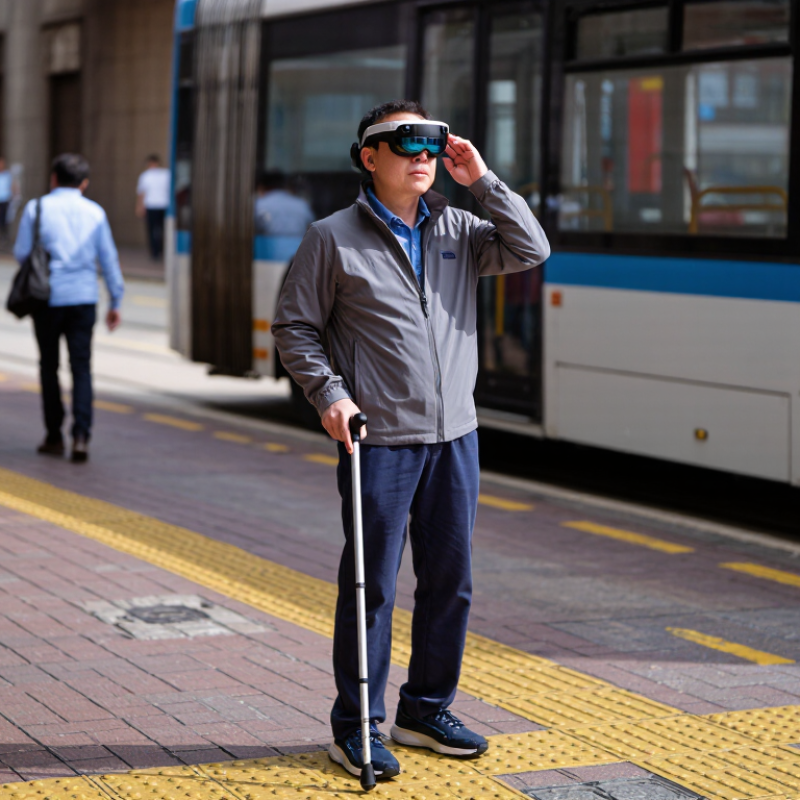
Why Choose AI Powered Smart Glasses for the Blind?

What Are AI-Powered Smart Glasses for Blind Users?

What Are AI-Powered Smart Glasses for Blind Users?

AI-powered smart glasses are wearable devices that use cameras, microphones, and artificial intelligence to describe nearby surroundings. They may recognize doors, read printed text, identify objects, and detect changes along a walking route. Audio feedback usually reaches the user through small speakers near the ears.

The experience can feel practical. A user might point toward a kitchen counter and hear, “Cup ahead, slightly right.” The glasses may read a medicine label or announce a nearby staircase. Voice commands can make these tasks more natural.

However, accuracy depends on lighting, camera position, language settings, and background noise. They are not magic.

Reliable use requires careful design and responsible testing. The device should provide clear guidance without blocking important environmental sounds. It should also protect images and voice data through strong privacy controls. A trained orientation specialist can help users practice with familiar routes before entering crowded places.

AI can misread a face, sign, or obstacle. That possibility deserves honest attention. Users should treat spoken descriptions as assistance, not absolute truth. I would also question overly confident alerts, especially near traffic or uneven ground. The best systems explain uncertainty and allow quick human judgment. Their value lies in supporting independence while respecting the user’s own skills, routines, and decisions.

How Do AI Smart Glasses Assist with Visual Recognition?

AI-powered smart glasses can turn visual information into spoken guidance for blind and low-vision users. A small camera scans nearby objects, printed words, and common signs. The system then describes what it detects through a discreet speaker or connected audio device. “Door ahead.” “Bus number 24.” Short messages can reduce uncertainty in unfamiliar places.

Visual recognition works through several AI processes. Optical character recognition reads menus, medicine labels, and handwritten notes, although handwriting remains difficult. Object detection may identify a chair, crossing, cup, or open doorway. Some systems can also recognize familiar faces, but this feature requires careful consent and privacy protection. During real use, clear lighting helps. Crowded scenes are harder. A wet street or reflective window may confuse the camera.

The glasses should support judgment, not replace it. Users still need a cane, guide dog, or trusted travel routine when conditions become risky. I would test recognition twice before relying on a critical label, especially when numbers look similar. The response can also arrive a few seconds late. That matters near traffic. These limits are easy to overlook when the device performs well indoors. Reliable products should explain uncertainty, protect captured images, and offer simple controls. Real assistance is not perfect recognition; it is useful information delivered at the right moment.

Why Choose AI Powered Smart Glasses for the Blind? - How Do AI Smart Glasses Assist with Visual Recognition?

Visual Recognition Dimension What AI Smart Glasses Can Assist With How the Assistance Works Practical Benefit for Blind or Low-Vision Users Important Consideration
Printed Text Recognition Reading signs, labels, menus, letters, documents, and short printed notices. A camera captures the text, optical character recognition converts it into digital characters, and text-to-speech reads the result aloud. Supports independent access to everyday written information. Accuracy can decrease with poor lighting, unusual fonts, curved surfaces, motion, or low image quality.
Handwriting Assistance Recognizing some handwritten notes, forms, or short messages. AI analyzes the captured image and attempts to interpret handwritten characters before providing spoken output. Can help users understand personal notes and basic handwritten information. Handwriting recognition is generally less reliable than printed-text recognition and should be verified when accuracy is important.
Object Recognition Identifying common objects such as doors, chairs, tables, cups, bags, vehicles, and household items. Computer-vision models analyze shapes, colors, and visual patterns in the camera view. Provides additional information about nearby surroundings and supports task completion. Recognition may be uncertain when objects are partially hidden, unfamiliar, distant, or visually similar.
Scene Description Summarizing visible surroundings, layouts, activities, and prominent visual details. A vision-language system interprets the camera image and generates a spoken description. Offers contextual awareness that may be difficult to obtain through touch or conventional screen-based tools. Descriptions are AI-generated and may omit important details or incorrectly interpret a scene.
People and Facial Information Detecting that people are present and, where supported and legally permitted, providing information about familiar individuals or visible expressions. Facial and person-detection models analyze visual features and return an audio response. May support social awareness and help users understand whether someone is nearby. Facial recognition can raise consent, privacy, bias, and local legal compliance concerns; it should not be treated as definitive identification.
Color and Appearance Recognition Describing basic colors, clothing characteristics, patterns, and visual differences between items. Image-analysis algorithms estimate color and identify visible appearance attributes. Can assist with clothing selection, sorting belongings, and distinguishing everyday items. Color perception may be affected by lighting, camera settings, material reflectivity, and surrounding colors.
Currency and Product Information Recognizing some banknotes, packaging, barcodes, or product labels when the relevant software supports them. The camera compares visual features or decoded text with an AI or digital information service. May help with shopping, item selection, and checking basic product information. Support varies by country, currency, language, product database, and software version; users should confirm important transactions.
Indoor Wayfinding Support Detecting visual landmarks such as entrances, corridors, stairs, signs, and room numbers. Computer vision identifies visible features and provides spoken cues or descriptions. Can supplement mobility skills by offering additional environmental information. AI visual assistance is not a replacement for a cane, guide dog, orientation and mobility training, or reliable navigation tools.
Audio Interaction Receiving spoken questions and delivering recognition results through audio. Speech recognition converts a user’s request into a command, while text-to-speech communicates the AI response. Enables hands-free access and reduces dependence on a visual display or smartphone screen. Background noise, accents, network delays, battery level, and audio volume can affect usability.
Real-Time Assistance Providing repeated visual descriptions while the user changes position or points the camera toward different objects. The camera and AI system process successive images and respond to user requests. Supports flexible, on-demand assistance in daily activities. Processing speed, battery life, connectivity, and device heat can limit continuous use.
Accessibility and Independence Combining visual input, voice control, and spoken feedback in a wearable format. The glasses provide information without requiring the user to hold a phone or look at a screen. May improve convenience, privacy, mobility confidence, and access to visual information. Benefits differ by individual vision level, hearing ability, technical familiarity, and the quality of the AI service.
Safety, Privacy, and Reliability Supporting visual information access while maintaining awareness of the device’s limitations. Images may be processed locally or transmitted to a remote service, depending on system design. Helps users make informed decisions about when AI assistance is appropriate. Users should review data permissions, avoid relying on AI for critical safety decisions, and follow applicable privacy laws and consent requirements.

What Key Features Support Independent Mobility?

For a blind traveler, independent mobility depends on timely information, not flashy technology. AI-powered smart glasses can describe nearby doors, crossings, signs, and people through a small camera. Voice prompts may identify “stairs ahead” while walking toward a station entrance. Some systems also read printed text, bus numbers, and room labels aloud. The useful detail is simple.

Obstacle detection should distinguish a low bench from an open path and deliver alerts without constant noise. Short audio cues or gentle vibration can preserve attention for traffic. GPS and route guidance may support unfamiliar streets, while offline functions help when signals fail. A clear voice interface matters when hands hold a cane, groceries, or a rail. Battery life, comfortable weight, and physical controls are practical safety features, not accessories. Accessibility evaluations also show the value of adjustable alert distance and speech speed.

These glasses are not flawless. Accuracy varies. AI can misread a dark doorway, crowded sidewalk, or reflective window. Rain, glare, and delayed connectivity may reduce accuracy. A trusted mobility routine should still include a cane, trained assistance, or local orientation support when appropriate. Privacy settings must explain when images are processed and stored. Test locally. Before daily use, try familiar routes and review missed warnings with an accessibility professional.

How Do Users Operate and Personalize These Glasses?

AI-powered smart glasses can become practical tools for blind users when controls feel simple and predictable. Many users operate them through voice commands, a small tactile button, or a connected phone application. A spoken request can ask the glasses to read a menu, describe a doorway, identify a banknote, or recognize nearby text. The response may arrive through open-ear audio, allowing users to hear surrounding sounds.

Personalization often begins with language, speech speed, and volume. Users can choose shorter descriptions for quick movement or detailed explanations for reading documents. Custom commands may help with repeated tasks, such as checking a bus number or locating a familiar object. A user might also adjust camera sensitivity, recognition distance, and notification settings. Small changes matter. A quiet café may require different audio settings than a crowded station.

Reliable use requires practice and careful judgment. Users should test descriptions in known environments before depending on them outdoors. Images can be unclear, text may be misread, and low light can reduce accuracy. Errors still happen. Privacy settings deserve equal attention, especially when cameras operate around other people. Turning off unnecessary recording features and reviewing phone permissions can reduce avoidable risks. Feedback from daily use can improve personalization, but users may need to rethink settings after illness, fatigue, or changes in mobility.

What Are the Benefits and Limitations of This Technology?

AI-powered smart glasses can help blind users interpret nearby visual information through a camera, processor, and audio output. In practice, they may read a bus number, describe a doorway, or identify a cup on a kitchen counter. Voice feedback can reduce the need to handle a phone. That matters when one hand holds a cane or shopping bag. Some systems also recognize text and familiar faces, but recognition should never be treated as certain. A quiet room is different.

The strongest benefit is timely access. A user might hear “stairs ahead” before reaching a landing or receive a short label for medicine packaging. This can support work, travel, and household routines. Personal experience will vary with hearing, language, lighting, and confidence. Training is important. Users need practice adjusting prompts, checking information, and combining glasses with mobility skills. An orientation specialist or low-vision professional can help test safe routines. Independent evaluations are more trustworthy than promotional claims.

Limitations are serious. Cameras may struggle with glare, crowds, low light, handwritten text, or unfamiliar objects. Audio descriptions can arrive late or overload the user with details. Battery life may not cover a full day. Internet-dependent features may fail during travel. Privacy also requires care, since surrounding people can be recorded unintentionally. The glasses can misread a sign. They cannot replace a cane, guide dog, medical advice, or human judgment. I would test them in familiar and unfamiliar places with a trusted professional, then record errors rather than only successes. That process can feel slow, but it exposes weaknesses before they become dangerous.

FAQS

What are AI-powered smart glasses for blind and low-vision users?

They use cameras, microphones, and artificial intelligence to describe nearby surroundings. Small speakers provide spoken information near the ears. They may announce doors, cups, signs, stairs, or printed words. They are helpful tools, not magic.

How can these glasses recognize objects and text?

A camera scans nearby scenes. Object detection may identify chairs, cups, crossings, or open doorways. Optical character recognition can read menus, labels, and short notes. Handwriting remains difficult. Reflective windows may confuse the camera.

Can the glasses provide walking guidance?

They may describe a doorway, staircase, or obstacle along a route. For example, the user might hear, “Cup ahead, slightly right.” Spoken guidance can reduce uncertainty in unfamiliar places. It should not replace a cane, guide dog, or trusted travel routine.

How do users control and personalize the glasses?

Users may speak commands, press a tactile button, or use a connected phone application. They can adjust language, speech speed, volume, and description length. Short messages suit quick movement. Detailed speech helps with documents. Small changes matter.

What conditions can reduce recognition accuracy?

Poor lighting, background noise, crowded scenes, and misplaced cameras can affect results. Wet pavement may create confusing reflections. Low light can reduce accuracy. The response may also arrive several seconds late. That matters near moving vehicles.

Can users rely on spoken descriptions completely?

No. Artificial intelligence can misread faces, signs, numbers, or obstacles. A confident voice can still be wrong. Users should treat descriptions as assistance, not absolute truth. I would check important labels twice before acting.

How should users protect privacy while wearing these glasses?

Users should review phone permissions and disable unnecessary recording features. Cameras may capture nearby people without their awareness. Strong privacy controls should protect images and voice data. Privacy is easy to overlook during daily use.

How can new users practice safely?

Practice on familiar routes, such as a quiet room or known hallway. Test object and text recognition before entering crowded places. An orientation specialist can provide useful guidance. Settings may need changes after fatigue, illness, or mobility changes. Mistakes still happen.

Conclusion

AI-powered spectacles for blind users are wearable assistive devices that combine cameras, artificial intelligence, audio feedback, and simple controls to help users understand their surroundings. They can identify objects, read printed text, recognize faces when appropriate, describe scenes, detect obstacles, and provide spoken directions. By converting visual information into clear audio or tactile cues, these glasses may support daily activities such as shopping, reading signs, locating household items, and moving through familiar or unfamiliar environments with greater confidence.

Users can typically operate the glasses through voice commands, buttons, or a connected mobile device, while adjusting speech speed, volume, recognition settings, and preferred assistance modes. The technology can encourage greater independence, reduce reliance on constant human support, and improve access to visual information. However, performance may be affected by lighting, background noise, internet availability, battery life, and recognition errors. These glasses are designed as helpful tools rather than complete replacements for mobility training, orientation skills, or personal judgment.

Evelyn

Evelyn

Evelyn is a professional marketing specialist dedicated to helping customers better understand the company’s products, services, and industry expertise. With a strong background in market research, content strategy, and customer communication, Evelyn combines creative thinking with practical......